

usage field in API responses can be used to observe token consumption; actual charges are based on platform usage records and bills.
Review consumption
Open the usage section of the console. Filter by available time ranges, keys, and models. Use request IDs to locate calls in trends and request details. Fields and refresh timing depend on the current console.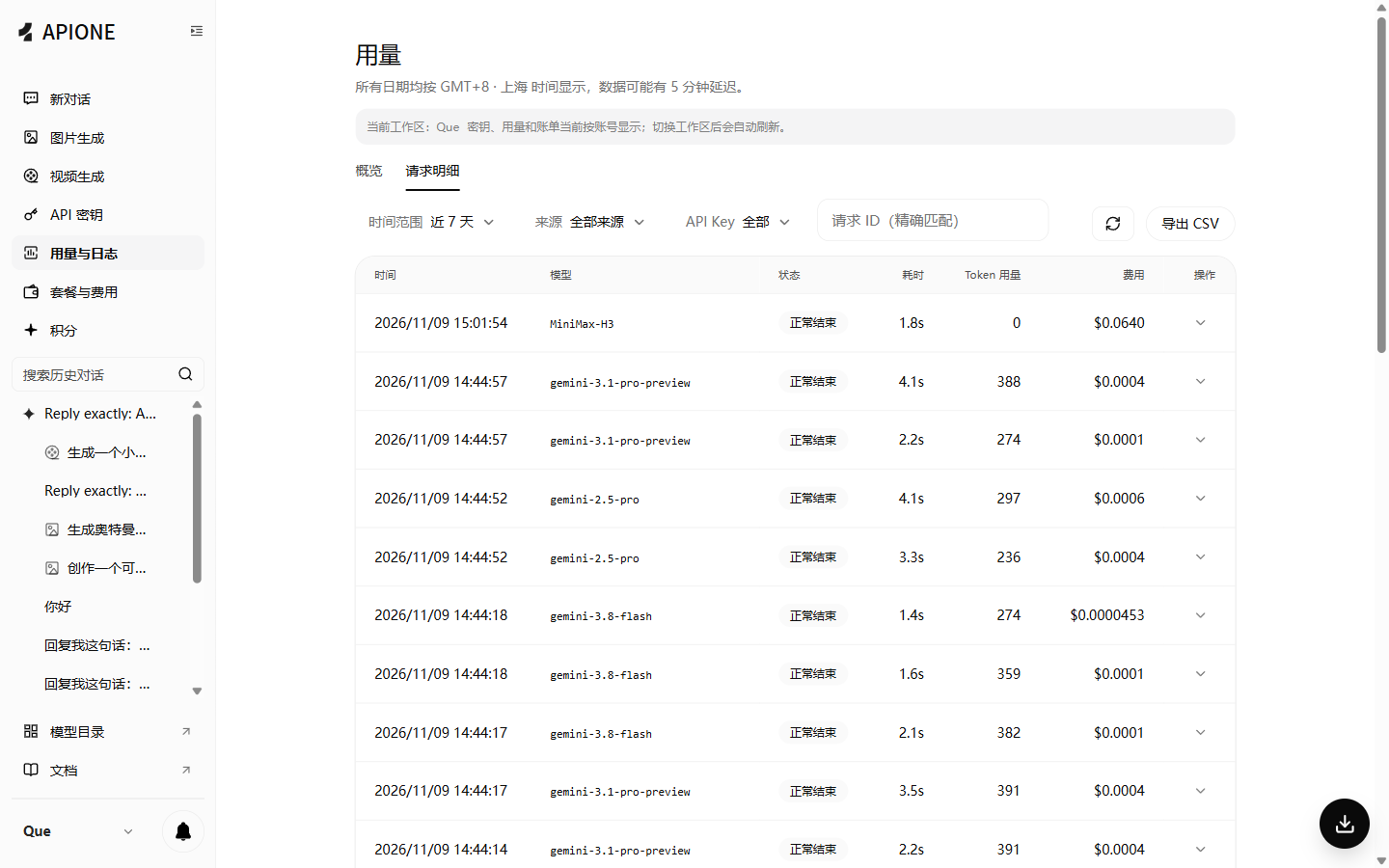
Request details can be filtered by time, source, API Key, and request ID, and you can view status, latency, tokens, and charges.
Tokens and charges
Chat responses commonly include prompt_tokens, completion_tokens, and total_tokens. Some models expose cache usage. Input, output, cached tokens, and media can have different prices, so multiplying all tokens by one rate may be incorrect.Use current model details, console information, and applicable terms for prices, currency, payment methods, minimum payments, refunds, and cache discounts. For the points program, see Points and referral rewards.
Group pricing and billing rules
What is group pricing?
APIONE can set different prices for the same model across billing groups, supporting individual developers, enterprise customers, and different use cases. Each request uses the model prices associated with the billing group selected for its API Key.How groups affect prices
Actual group names, available models, and prices are shown on the platform. A group may support only a subset of the platform’s models.
Calculate token-based charges
For models billed by tokens, use the following formulas when input and output prices are quoted per million tokens:Calculation example
For 10,000 input tokens and 2,000 output tokens, with input and output prices P and Q per million tokens, the base charge is0.01 × P + 0.002 × Q. This illustrates the formula; replace P and Q with the actual model and group prices.
Select a billing group
- Open API Key management in the APIONE console.
- Create or edit an API Key and select an available billing group.
- Review the group’s supported models and their input and output prices.
- Save the configuration and make requests with that API Key.
The same model may have different prices across groups. Group prices can change; check the latest prices shown on the platform. Usage records and bills determine the actual charges.
Plan credits and pay-as-you-go balance
APIONE plans are one-time purchases, not automatically renewing subscriptions. The full credit allowance is issued at purchase, not daily. Every plan is valid for 28 days.
The pay-as-you-go balance is separate from plan credits and is unaffected by upgrades or plan expiry. At expiry, the plan ends and unused plan credits are cleared. Buy another plan yourself if you want to continue; no renewal payment is taken automatically.
Upgrade during the validity period
You can upgrade at any time while the plan is valid. Pay the difference between the new and current plan prices, prorated by the time remaining. The upgrade takes effect immediately and keeps the original expiry time. It does not restart a 28-day period. For example, upgrading a Plus plan after 20 days leaves 8 days of validity. Keep the current plan’s unused credits and add only the prorated difference between the two plans’ total credit allowances. A full new allowance is not issued again. Each subsequent upgrade uses the current tier immediately before that upgrade, preventing repeated credit grants.Downgrades and expiry
Downgrades are not supported. Wait for the current plan to expire, then select and purchase another plan. Only unused plan credits are cleared at expiry. The separate pay-as-you-go balance remains unaffected, and the plan does not renew automatically.Recharge verification
- Select an amount on the recharge page and enter the checkout. Verify the actual payment currency, amount, and payment method.
- After payment, return to APIONE and check the order status and balance change.
- If the order is still processing, query the original order and keep the payment receipt.
- When support is needed, provide the order number, payment time, and amount. Avoid submitting the full payment account or API Key.
Control concurrency
APIONE limits concurrent requests per API Key. Upstream rate limits can also apply. Use the concurrency quota configured for your account. Use a queue or semaphore for batch work. For 429 responses, honor Retry-After when present and use bounded exponential backoff with jitter. Avoid infinite retries or creating extra keys to bypass limits. Do not silently restart interrupted streams, which can duplicate generation and charges.Failed, cancelled, and interrupted calls
Model calls finally classified as failed by the platform are not charged. A client timeout, cancellation, disconnected stream, or failed download after successful generation does not by itself mean the platform call failed. If generation completed or billable usage was confirmed, the applicable model and group rules determine the charge. For streaming, check the final status and actual usage rather than HTTP 200 alone, the client’s error message, or whether the client received every output chunk. Incomplete delivery does not prove that no generation occurred. For a disputed status or charge, retain the request ID, timestamp and timezone, model, final status, and error details, then contact support. Confirmed erroneous or duplicate charges are corrected after investigation. Avoid repeatedly creating tasks while the original outcome is unknown.Cost checklist
- Limit unnecessary conversation history and maximum output.
- Compare quality and usage on a small representative sample first.
- Separate testing and production keys and investigate unusual activity.
- For client errors, check the platform’s final status before retrying. Avoid duplicate requests while the outcome is unknown.